
 |
 |
 |
Tool for easy playing demos of game Call of Duty 4: Modern Warfare.
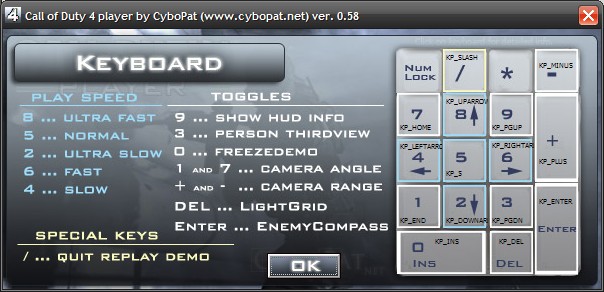
You can use slowmotion, faster playing, freezing demo, toggle third person view, toggle view HUD info and some keys for cheathunters.
Installation and run:
1. Download file cod4player.zip (227 kB, cod4player.exe + readme.txt).
2. Just unzip file "cod4player.exe", but rather don't put it into the COD4 folder. Then simply run it.
Controls:
* In main screen click on the keybord to show info about controls.
* You can set association demos in Setup menu and then just click on demofile to playback.
Restrictions:
- If You have CoD4 just as copy on HD (no info in registry), cod4player ask You for path to iw3mp.exe.
- Windows Vista: When get this error "Permission denied", run cod4player as Administrator (right mouse on cod4player ad select from menu Run as..)
BIG thanx to:
Player Rellik to idea "how to.." :) and Rei for inspiration about "cheatkeys".
<< Back